Tuesday, May 20, 2014


A Gamer, a History Buff and an Extreme Type A…Equals the PC eLearning Team?

By Jamie Guillaume

If I examined the faculty and staff of Perry Central to try to put together a team, I can honestly say that prior to this year, I would not have said, "Let’s put Phil, Kris and Jamie together. " However after working, learning, reading and attending conference upon conference with this team, I have discovered we actually make the perfect trio! 

Kris, our gamer, is fantastic at fixing any electronic device that is not working properly and could very easily be described as an Apple whisperer (the electronic, not the fruit). He has mastered video editing and has helped bring coding and app creation to life at Perry Central and these are only a few of his various projects. 

Phil, the history buff, is a My Big Campus (MBC) genius!  He understands the program and uses it in his social studies classroom as a content platform.  Project-Based Learning (PBL) is also one of Phil’s many strengths.  He has become a model for PBL classrooms and has coached other teachers into becoming proficient PBL and MBC users. 

Then there is me, the extreme type A personality.  A role of mine has been to sift through our learning and push out ideas and coach teachers on webtools and programs appropriate for their classrooms.  Another one of my contributions to our team has been keeping us focused on the goals of our grant we are working under, to ensure we are completing the tasks listed and keeping our schedules and agendas organized and fulfilled.

Although it would appear the three of us have nothing in common, the shear fact that we all love our jobs, have a passion for being a mover and a shaker in education and want to see Perry Central do what’s best for our students, has made us a compatible and effective team.

Earlier editions of Techy Tuesday have explained the new roles Kris and Phil will take as one school year ends and another begins.  I am excited to convey that I am going to have the opportunity to work with one of my closest friends whom I highly respect, Sarah, in a 5th grade setting.  She and I will split the day in a 5th grade classroom blending our strengths and passions together to guide the learning of 5th graders. 
The other portions of my day will be spent as an eLearning Coach and Media Specialist, residing in the High School Media Center.  I have big hopes and dreams of the Media Center transforming from a place that students use only when required to a place where students want to be. I envision a setting where resources are discovered and utilized in an environment equipped with the technological tools needed to work, study, learn and collaborate in a welcoming and comfortable space. 

As I reflect on this school year I am thankful for all I have learned. It has been the steepest learning curve of my career and I look forward to continuing that learning incline!

Tuesday, May 13, 2014

Year of eLearning/Start of LEAF
By: Phil Zellers

With this being my last Techy Tuesday post of the year, I want to take some time to reflect on my eLearning experiences from this year and talk about my excitement for next year.  It has been an exciting year full of learning.  Through conferences, book clubs, collaborating on projects, and working with other teachers and students, I have had the opportunity to learn about a variety of great technology tools to use in the classroom.  More importantly, I have learned about how to integrate technology into the classroom as a tool to enhance student engagment.  Along the way, I have been able to connect with a lot of other educators and have learned so much from them (follow #INeLearn on Twitter if you don't already).  Being a connected educator is so important.  It opens you up to a whole new world of seemingly endless resources.  I feel so fortunate to have been able to serve as an eLearning coach this year!

I'm very excited that I get to continue this work next year as an eLearning coach, keeping a similar schedule as this year's.  There are always new tools and ideas coming out about technology integration.  To me, this is one of the most exciting parts of our profession, that it is always evolving.
 
As a way to support passion based learning, we will be offering a new LEAF (Learning Experiences in Applied Fields) class next year that I will facilitate.  I really hesitate to call myself the "teacher" of that class because it will be mainly student driven.  I will be more of a facilitator and resource for them.  I had the pleasure of visiting the original LEAF group with Jody a couple of weeks ago at VUJC.  This group was completely organized by students.  They started because there were things they wanted to learn but couldn't in the regular school day.  They now meet several times a week to learn about topics they are interested in and share to their knowledge.  There are groups learning about architecture, computer programming and software, robotics, and other topics as well.  I had heard about this program from others but after meeting with this group, I came away completely inspired.  A group of our students went with us that day and are very excited about the opportunity as well.  

We want to offer our students a chance to do that learning during the traditional school day.  So, we are offering a LEAF class students can take as an elective.  There will also be a mini class for 7th graders that will operate similarly.  I think this is a great opportunity for our students and that they'll do some truly great things with it!  I can't wait to see what our students are passionate about.

I have truly enjoyed working with everyone this year in my role as an eLearning coach.  I always feel so fortunate to get to be a part of Perry Central.  Finally, I am grateful to have gotten to work as a team with Jamie and Kris.  We have attended a lot of conferences together, had many brainstorming sessions and I have learned so much from both of them.  I'm looking forward to another great year next year!              


Tuesday, May 6, 2014

Launching STEM in the elementary

By Kris Walsh

I have enjoyed this year working as an eLearning coach. I have gotten to assist teachers and students in using technology both in class and out of class. We have had the opportunity to teach lessons on using new hardware, Google Drive, Prezi, video editing and more. It has been a busy and great year and I look forward to being able to work with the eLearning team to continue moving forward in using technology to further learning experiences for our students.


One of my favorite experiences of the year was working with robotics teams in the Elementary and Junior High. Students can learn so much from this process. Students learned about obvious things like robot design and programming, but they also learned about teamwork, problem solving and how to not give up on a difficult task. When I first learned about a program that could bring science and technology to more students. I was very interested.

Next year, in addition to continuing as part of our eLearning team and working in the special needs department in the high school, I will be starting an exciting new program in grades 3-6 next year. I will be starting Project Launch in the elementary. Launch is a new program that has been designed by Project Lead the Way to bring instruction in STEM (Science Technology Engineering and Math) to the elementary. The current school year was a pilot year for this program. A few selected schools nationwide participated in this program. Next school year is the first official year of Launch. I am proud that we can offer this to our students. I think that it will really serve as a supplement to in class science instruction and increase students' interest in STEM.


This program will happen in grades 3-6 as one of the special/rotation classes for these grades. PLTW has designed a curriculum with hands-on activities that is particular to each grade. These are the subjects that will be covered in each grade: (1st semester/2nd semester)

3rd grade- Materials Science: Properties of Matter/Form and Function

4th grade- Stability and Motion: Science of Flight/Forces and Interactions

5th grade- Energy: Collision/Conversion

6th grade- Robotics and Automation


I will be attending some training in the summer to become certified as a Program Launch teacher. I am excited about attending this training and learning more about the program. I look forward to sharing more with the staff and students as I learn.


Tuesday, April 29, 2014


Close Reading Without Reinventing the Wheel
By Jamie Guillaume
Close reading has been a topic of discussion in both the elementary and Jr.-Sr. high schools recently.  It is a skill that can be practiced and used in text of all subject matters. The Common Core’s focus on students gathering evidence, knowledge, and insight from what they read across the curriculum has reinforced the importance of this skill.

Sometimes the hardest part about teaching close reading is finding quality, complex texts to read, re-read, think about, and respond to in writing and in conversation.  


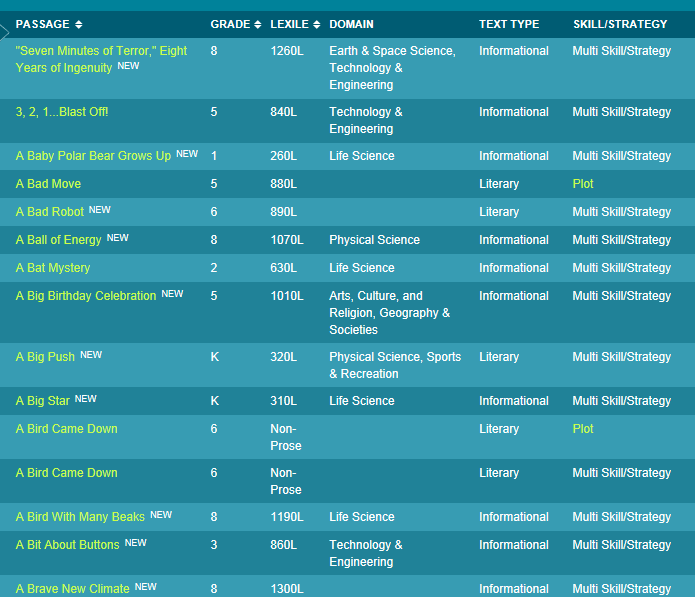
Last week I had the opportunity to attend a workshop that outlined the big picture of close reading and gave tips and suggestions for passage selections as well as accompanying questions to develop and practice this skill.  The presenter, Shauna Findlay, recommended a site that I have used in the past, readworks.org, which reaffirmed its usefulness.  This site has quality lesson plans organized by Skill & Strategy, Comprehension, Novel Study and Reading Passages.

The graphic below was pulled from readworks.org.  As you can see there are a variety of passages organized by grade, Lexile, domain (subject), text type and strategy. 


Another site that houses rich text is achievethecore.org  This particular site has a section dedicated strictly to close reading!  Full lesson plans along with text excerpts are all included! 

The below screen shot is an example of one of the many available lessons.  Once downloaded, you have access to all of the documents needed for the lesson described.   There are multiple close reading lessons geared towards all grade levels available.

Although the above sites give passages designed to foster close reading, many teachers have passages they are familiar with and prefer to use.  Below are tips for questions and discussions that can be used to promote close reading lessons.

Questions and Discussions:

  • Can only be answered with evidence from the text
  • Can be literal, an understanding check, but must also involve analysis, synthesis, and/or evaluation
  • Focus on a word, sentence, and/or a paragraph, as well as larger ideas, themes or events.
  • Focus on difficult portions of text in order to enhance reading proficiency.
  • Can also include prompts for writing and discussion questions.

As you continue to focus on close reading within your classroom, consider the above sites to pull resources.  We are all busy and if we can find material using free, quality resources, why reinvent the wheel more than needed?  

Tuesday, April 22, 2014

Book Review Part 1: Thrive: 5 Ways to (Re)Invigorate Your Teaching

By: Phil Zellers


I recently had a "moment" when I was reading Meenoo Rami's, Thrive: 5 Ways to (Re)Invigorate Your Teaching, while listening to a talk show on ESPN Radio.  At first, I'm sure it's hard to imagine how those two could possibly be connected in any way.  As I was reading a section in the book about keeping your work intellectually challenging, the sports talk radio host began talking about being content.  His meaning of the word was technical as "not wanting more."  I often use the word content to mean being happy but that's not the version of the word I'm discussing here.  He said there are a lot of professions where if you become content you will become irrelevant.  He went on to say that you can't be content as a college or professional sports coach or you won't make it.  He was criticizing a particular coach and said if that coach wanted to be content he should go be a "school teacher or college professor."  I paused to think about that for a second, referred back to the section in Thrive I was reading, and quickly realized how wrong he was.  Education is constantly changing, with new technology transforming the classroom, new research coming out all the time, and standards being changed.  As educators, we are always working to reflect on our teaching, tweak lessons to make them better, and making sure our students are adequately prepared for when they leave Perry Central.  We always want "more" for our students, more opportunities, more chances for success, more passion.  
     
In Rami's Thrive, she talks about ways to stay current, connected and fulfilled as an educator.  This is Part 1 of the book review because I am not all the way through the book yet.  Rami offers 5 ways to invigorate or reinvigorate your teaching.  This is a book for new and experienced teachers alike.  I have made it through the first 3 ways and that's what I'll be focusing on in this entry.

Turn to Mentors
The author argues how important it is to find good mentors who will be able to give you good advice and feedback about your teaching.  She says to find people that are passionate about their work, enjoy their job and who lift your spirits every time you see them in the hall as mentors.  I have been very fortunate to have great mentors, at Perry Central, who have helped me become passionate about my work, recommended books to read, given me resources, challenged me to be a better teacher, and have just been a positive influence in my life.

Join and Build Networks
Rami has a quote from James Surowiecki, author of The Wisdom of Crowds, in this section that really stood out: "...Under the right circumstances, groups are remarkably intelligent, and are often smarter than the smartest people in them."  As teachers, we see this in the classroom at times when students doing group work come up with something amazing.  As teachers, we have also worked in teams, either in grade levels or by departments and have experienced the power of working together.  With technology, we can expand our network beyond our own building.  Through social media (Twitter, Google + communities, etc.), we can connect with educators around the state and country who teach the same classes we do to share ideas and resources.  We can also connect our classes with other classes around the country and world even.  It can be powerful and helpful to network with other teachers and students around the world to learn from them.

Keep Your Work Intellectually Challenging
Rami acknowledges all the stresses and pressures that can weigh a teacher down throughout the course of a year but she explains that by keeping your work intellectually challenging you can stay invigorated in your work.  A quote from her that stands out in this section is: "When we own our ability to create conditions where learning and joy can live side by side, we take the power back."  That was a really powerful quote for me.  If we can find a way to keep our classes fresh and relevant joy and learning can live side by side.  Balancing the work of preparing our students for state testing and keeping it fresh and relevant can be challenging but Rami argues that can also be invigorating.  Some ways to keep your work intellectually challenging?  Create your own curriculum.  Liberate yourself by moving away from the textbook from time to time.  Read widely in your profession.   Find books, blogs, and videos relevant to what your teaching.  She also recommends doing the reading you enjoy as well.  You never know where that next great lesson plan may be.  It could be in that book you've been wanting to read just for fun.  I like to keep up with some of the books my students are interested in (although I'm usually way behind).  That means I have taken time to read the Hunger Games series and am currently trying to work my way through the Divergent series.  I enjoy reading them and it's also way to connect with students.  Rami says we should do this because it "may provide us with the inspiration to find ideas and a necessary mental break from the rigors of the classroom."

So far, one theme I have seen over and over in her book is that to invigorate our teaching we must help students find their own passions.  There are two more ways to come in a future blog post: Listen to Yourself and Empower Your Students.  Hopefully, by the time it's my turn to blog again I will have the reading done.  Thrive is a book I have found meaning in and recommend to others as well.  It is a pretty short book, I'm just a slow reader, especially during baseball season!  

Tuesday, April 15, 2014

Animate Your Awesomeness with PowToon


By Kris Walsh

There are many ways for students to learn and demonstrate their learning. As illustrated by last week’s post that Jamie did about the SAMR model, we can leverage technology in many different ways. Students can do worksheets, take tests and answer questions online, and while this is an improvement in the way students demonstrate learning, it is still doing a more traditional task in a new way and would be considered an A or augmentation on the SAMR model.

One thing that I have enjoyed seeing and being a part of this year has been the increasing amount of project based learning where students are demonstrating their learning in new ways. I have seen many cool videos and other projects this year. The technology that we have at hand provides many opportunities for students to create and demonstrate learning in new ways. The focus of this week’s post is a new tool for creating presentations called PowToon.

Many teachers are familiar with presentation software like PowerPoint, Prezi or even Thinglink. PowToon is a new fun and free web-based tool that students can use to create presentations. This tool is more complicated in that it has more options than some of the other presentation tools, but the products that can be created can be very creative and fun with a “cartoony” feel. 

Click the video to learn more


First, you will have to go to www.powtoon.com to create an account. Students need to be over 13 to create their own account. If you have students younger than that, you will have to let them have access to an account that you create for them. Students older than 13 should create their own account to make it easier for them to keep track of their own work and progress.

You can then choose to create using a template that students can use to make some minor tweaks, or start from scratch. From there, PowToon functions similarly to other presentation software, the difference is that it has many more animation tools that can be used to make the presentation come to life. All of the options seem daunting at first, but the tools and functions are pretty intuitive as you get into them.

What you cannot see in a static screenshot, all of the characters are animated, or can be. And the text is as well. You have tools on either side of the main window, and a timeline at the bottom of the screen that you can use to set the timing of when animations occur and how long they last. The presentations are saved on your PowToon account, but can be easily downloaded or sent to youtube as a video.


 This post is just an introduction to this webtool. If you look into this and want to learn more about it, please contact one of the eLearning coaches, we would be glad to assist you in learning more.

Tuesday, April 8, 2014

Using the SAMR Model to Promote a Paperless Classroom
By Jamie Guillaume


The Substitution Augmentation Modification Redefinition (SAMR) model is a framework for teachers to use that guides the progression of using technology to redefine teaching and learning in the classroom, while enhancing student engagement. 
The diagram below outlines the SAMR model explaining a definition of each part of the model and a task example.
Substitution:  In this level of the model, the technology used does not change the task but just varies its completion.  For example instead of students completing a handwritten outline of their Social Studies chapter, they use Microsoft Word to type the outline.  Although there is not a change in the teaching and learning, technology integration is still being attempted.
Augmentation:  This stage of SAMR uses more functions of the technology to complete the task.  For example, perhaps instead of students taking a quiz using paper and pencil, the assessment could be conducted through a Google form.  Through this format, teachers receive immediate, paperless feedback to evaluate student understanding. 
Modification: During this phase, the task begins to be redesigned and technology is used to transform typical assignments within the classroom.  For example, students may share a Google doc to work on a project and using the share feature work together to highlight, comment, and receive immediate feedback from the teacher. 
Redefinition: This is the highest transformation stage of the model. During redefinition, the task is completed in an entirely different format using technology and collaboration to create various products using multiple media sources.  For example students from different schools create a project together using Facetime or Skype. 
The diagram below shows how the simple idea of a book report can be taken through all four stages of the SAMR model.
The SAMR model can be used to transform a classroom into a 21st Century setting and promotes using more technology and less paper!